👋 Open to work / collaboration — I'm between jobs right now, and this repo is what I build in that spare time. Happy to hear from anyone this resonates with. Besides remote work, I'm also open to a half-collaboration: a few thousand RMB a month for living costs plus a profit share. On-site trips are possible where the work genuinely needs them. What I'm really after is finding people on the same wavelength to build something in this AI wave. Email: eternityspring@gmail.com · Résumé: resume.79px.com · WeChat
hao_dev(please mentiongithubwhen you add me)These skills are free and open source, built and battle-tested on real AI short-drama production. If they save you an afternoon, consider buying me a coffee on Ko-fi ☕ — it keeps the updates coming.
shuohao-skills
Agent-agnostic skills for AI short-drama production — from a novel to shoot-ready material: character bibles, adaptation outlines, scene & prop bibles, screenplays, opening staging, and storyboards. Each skill is self-contained and works with any Agent that can read SKILL.md and run the bundled scripts; Claude Code and Codex are two supported examples, not requirements.
The repository now contains seven skills: six production stages plus standalone character reference generation. The outline settles the adaptation; characters, art, and screenplay iterate together; staging fixes each scene's opening positions before storyboarding.
flowchart TD
    novel[Source novel] --> outline[novel-outline]
    outline --> characters[novel-characters]
    outline --> art[novel-art]
    outline --> script[novel-script]
    characters <--> art
    art <--> script
    script <--> characters
    characters -. Character designs .-> refs[character-refs]
    art --> staging[novel-staging]
    script --> staging
    staging -->|Copy opening blocking| storyboard[novel-storyboard]
    refs -. Reference images .-> storyboard
    storyboard --> production[Video production packs]
| Skill | What it does |
|---|---|
| novel-outline | Adapts a novel into a five-piece short-drama outline: adaptation notes, cast, beats, per-episode synopses, asset list (including a narrative-prop table). All 14 quality gates are script-checked; includes a checkup mode for existing outlines |
| novel-characters | Turns the cast the outline settled on into a character bible: profiles, design prompts, voice prompts, model sheets. Seeds the roster from outline.json; report language is configurable |
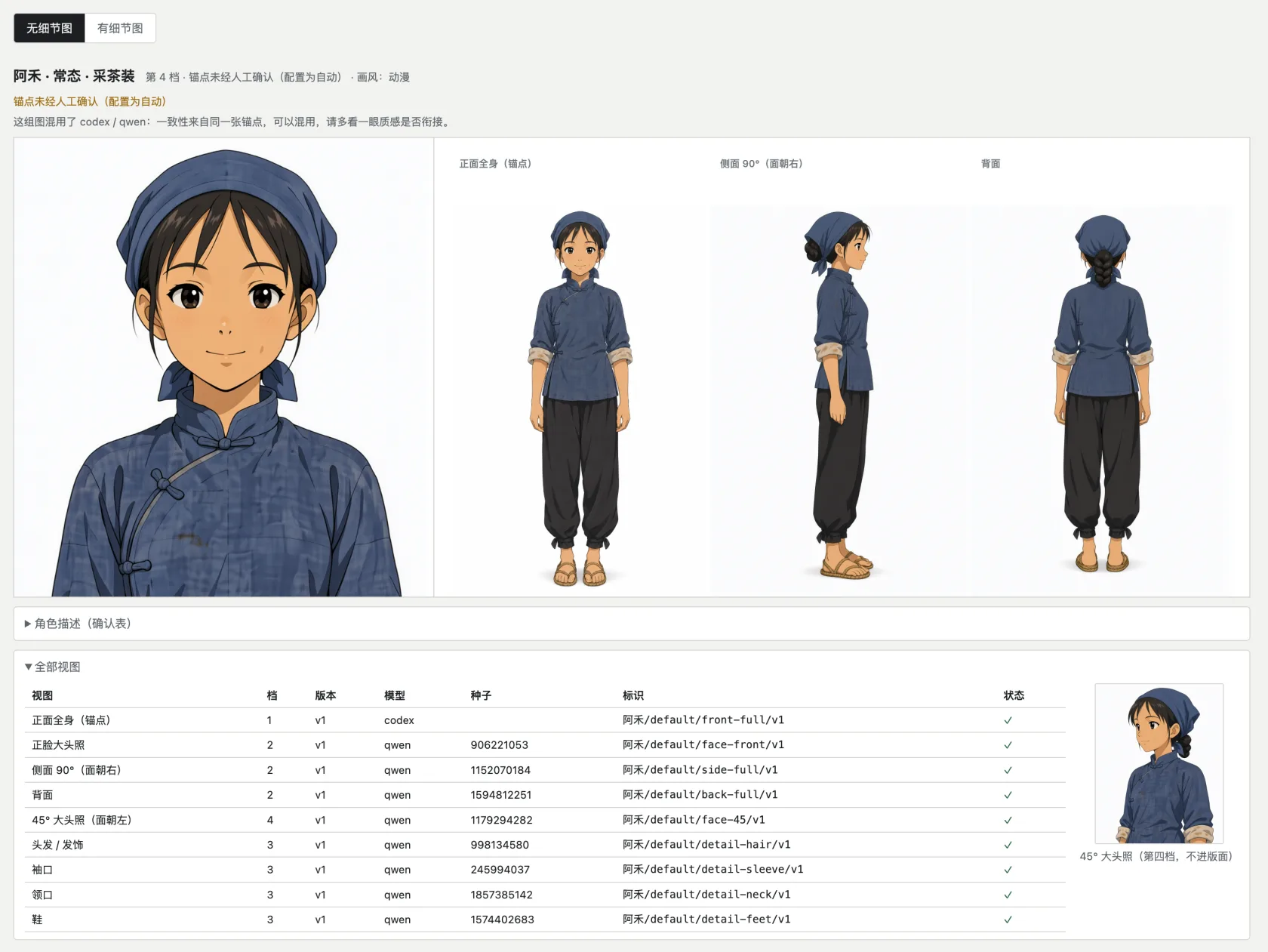
| character-refs | Actually generates reference images for characters from any story (not just novels — your own original story works too): describe a character in one message; it is split into fields, gaps filled and confirmed, then a front full-body anchor is generated and every other view (headshot, 90° profile, back, details) references only that anchor, in on-demand tiers. Every image is labeled and individually regenerable, with staleness tracked. Works with Qwen Image (ComfyUI), codex image generation, the GPT Image 2 API, or a custom command |
| novel-art | Art bibles for AI production (scenes + narrative props): consistency anchors, lighting & state variants, scale references, no-people/no-hands white plates. Seeds from outline.json; all 10 quality gates script-checked |
| novel-script | Screenwriting for AI short drama: scenes + beat flow (action beats alternating with dialogue lines), per-episode duration deterministically estimated from reading speed, a gated cold-open hook in the first 3 beats, a per-character line book with voice prompts that feeds straight into TTS. All 10 quality gates script-checked |
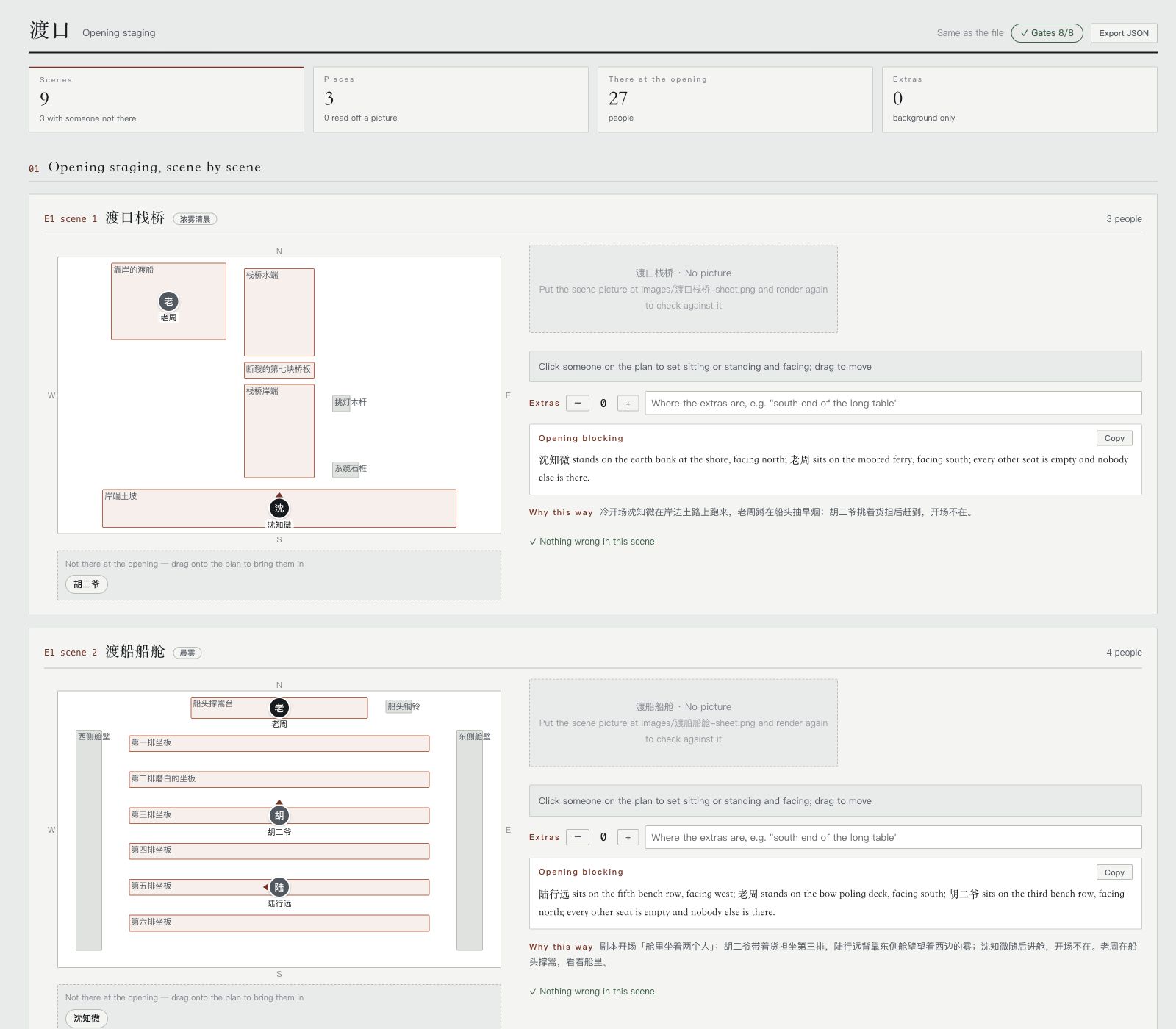
| novel-staging | Plans opening positions from the screenplay and scene images: each character’s seat or standing position, facing direction, opening presence, and extras. Produces staging.json, an editable top-view report, and opening blocking sentences for the storyboard. All 8 quality gates script-checked |
| novel-storyboard | Storyboarding for AI short drama: segments (one generation, ≤15s) → cuts (2–5s hard gate) → keyframes (master pinned at 0.00s, sub-frames at their cut marks), with MiniMax H3 prompt alignment and cut times audited verbatim; frames actually generated with the design sheets as references, plus one-command H3 / Seedance production packs. All 18 quality gates script-checked |
All six pipeline skills render their reports in English too — reports default to a Chinese UI; pass --lang en to render for a fully English report (data content stays as authored). character-refs ships Chinese, English and Japanese UIs too, and translates on the spot for other languages.
Scene Staging: inputs, outputs, and handoff
novel-staging runs after the screenplay and before the storyboard. It reads script.json for scenes and cast; art.json supplies locations, outline.json supplies character names, and scene images show the objects people can stand beside or sit on. The screenplay is required; the other inputs improve the result. Without scene images, positions inferred from the art specification are marked provisional. These files can come from any producer; no other skill installation is required.
| Output | What it provides |
|---|---|
staging.json |
Opening presence, anchor object, side, position, posture, facing, and extras for every scene |
staging.md (optional) |
Text export with inventories, position tables, and opening blocking sentences |
staging-report.html (default) |
Interactive tool report with a draggable top view and live checks; export edits back to JSON |
blocking command output |
One opening blocking sentence per scene, ready to copy into its first storyboard segment |
An Agent reads the scene images and plans the staging; the bundled Node.js tools seed the data, check the eight gates, render reports, and generate the blocking sentences. The HTML tool report is the default user-facing result and opens locally in a browser. JSON is working data; Markdown is generated only on request. To try the completed sample from the repository root:
node skills/novel-staging/scripts/novel-staging.mjs validate skills/novel-staging/examples/渡口-staging.json --script skills/novel-staging/references/test-fixtures/upstream/渡口-script.json --art skills/novel-staging/references/test-fixtures/upstream/渡口-art.json
node skills/novel-staging/scripts/novel-staging.mjs render skills/novel-staging/examples/渡口-staging.json --lang en > staging-report.html
node skills/novel-staging/scripts/novel-staging.mjs blocking skills/novel-staging/examples/渡口-staging.json --lang en
The storyboard does not automatically import staging.json yet. Give the Agent the accepted opening blocking sentences and ask it to copy each one into the first segment of its scene. This stage outputs staging data and reports; it does not generate images or video. See the skill guide for authoring a new staging plan.
One page for five stage reports
The assembler currently supports outline, characters, art, screenplay, and storyboard. It does not include the staging report or character-refs gallery. These five supported reports can be merged into a single page with a left-hand nav — you get a pane for every supported stage you actually have:
node scripts/report.mjs --from --out report.html
--from discovers the five json files using the working-directory convention; you can also point at each one directly (--outline --cast --art --script --storyboard). Ran only the character pass? You get one pane, no error.
It is an assembler, not a separate skill: it imports no skill code, it shells out to each skill's own render --html and stitches the results. So the five skills stay untouched, still run standalone, and are still copyable on their own — and when a skill changes its rendering, this picks it up for free.
Merging solves three problems, all of them inside the assembler, none inside the skills:
- Style bleed. The five reports share 57 class names, 13 of which mean different things in different reports (
.copy,.kpis,.badge,.chip…), so every selector gets a scope prefix - Script bleed. Each report's script does document-wide lookups like
document.querySelector('.expo'). Merged, that only ever finds the first one — all five export buttons would break. Each script gets wrapped in a scoping proxy - Asset paths. Each report's images are relative to its own json directory (
images/…,E01-01/f1.png) and get rebased against the output file
One pane shows at a time by default (the five together run to roughly 600k characters). "Show all" in the bottom-left expands every pane so Cmd+F reaches the whole document. Number keys 1–5 switch panes, and #pane-script deep-links straight to one.
node scripts/report-selftest.mjs # 92 assertions, no browser needed
Reports from the six production stages:
novel-outline · short-drama adaptation outline

novel-characters · character bible
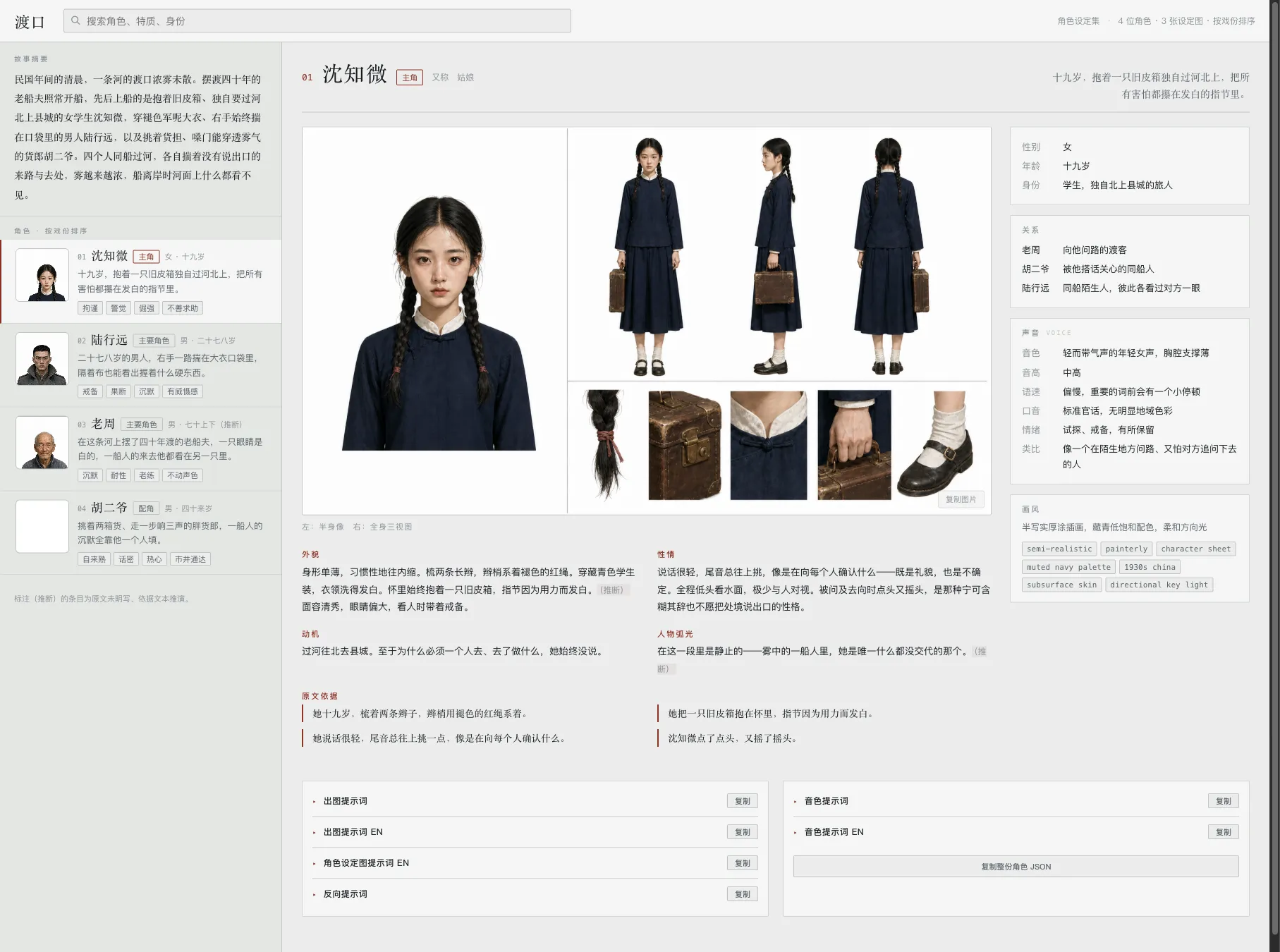
novel-art · art bible (scenes + props, sheets actually generated by the skill)

novel-script · screenplay (duration gauge + episode scripts + line book)

novel-staging · opening staging (a top view you drag people on, then export)
novel-storyboard · storyboard (cut rhythm strip + master/sub keyframes actually generated by the skill + H3 prompts)

No novel needed for this one — real reference images for any character:
character-refs · character references (anchor by GPT, the rest by Qwen, all actually generated by the skill)
Install
git clone https://github.com/eternityspring/shuohao-skills.git
cd shuohao-skills
./scripts/install.sh
The installer currently detects Claude Code and Codex and symlinks every skill into place — so git pull takes effect immediately, with no reinstall. The skills themselves are not tied to either runtime. For any other Agent, copy or symlink the skill directory into its skills directory, or load its SKILL.md directly.
./scripts/install.sh novel-characters   # just one skill
./scripts/install.sh --codex            # only into codex
./scripts/install.sh --uninstall        # remove the symlinks
Prefer to do it by hand:
AGENT_SKILLS_DIR=/path/to/your-agent/skills
ln -s "$PWD/skills/novel-characters" "$AGENT_SKILLS_DIR/novel-characters"
ln -s "$PWD/skills/novel-characters" ~/.claude/skills/novel-characters
ln -s "$PWD/skills/novel-characters" ~/.codex/skills/novel-characters
Requirements
| Required? | Notes | |
|---|---|---|
| Node | Yes | ≥ 18. The skill scripts use only the standard library — no npm dependencies, nothing to install |
| Model quota | Yes | Uses your current session's quota. No API key needed |
| Agent runtime | Yes | Any Agent that can read SKILL.md and run the bundled Node.js scripts. Claude Code and Codex are supported examples |
| Image model | Only for character-refs | One of: your own ComfyUI (Qwen Image), local codex image generation (uses your ChatGPT plan quota), an OpenAI API key (GPT Image 2), or a custom command. Chosen on first use |
Note on output language. These skills are Chinese-first.
novel-charactersproduces Chinese character profiles even for an English source novel, and its validator actively rejects English in those fields. See that skill's README for what it would take to change.
Repository conventions
One directory per skill, self-contained and copyable on its own:
skills//
├── SKILL.md          the workflow the agent reads (required)
├── README.md         the docs a human reads
├── scripts/
│   ├── .mjs    deterministic helpers, zero dependencies
│   └── selftest.mjs  self-test, never calls a model (required)
├── references/       detailed instructions, loaded on demand
├── examples/         bundled samples that double as test fixtures
└── assets/           screenshots
Two hard requirements:
- Every skill must have a
SKILL.md - Every skill must have a
scripts/selftest.mjsthat calls no model and costs no quota, covering all deterministic logic
Run every self-test before adding a skill:
for f in skills/*/scripts/selftest.mjs; do node "$f"; done
There is no CI — the self-tests run in about a second, so running them locally beats waiting on a pipeline. Only tested on macOS with Node 24; there is no platform-specific code, so Linux and older Node releases should be fine, but that is unverified.