Gemini Live API Examples
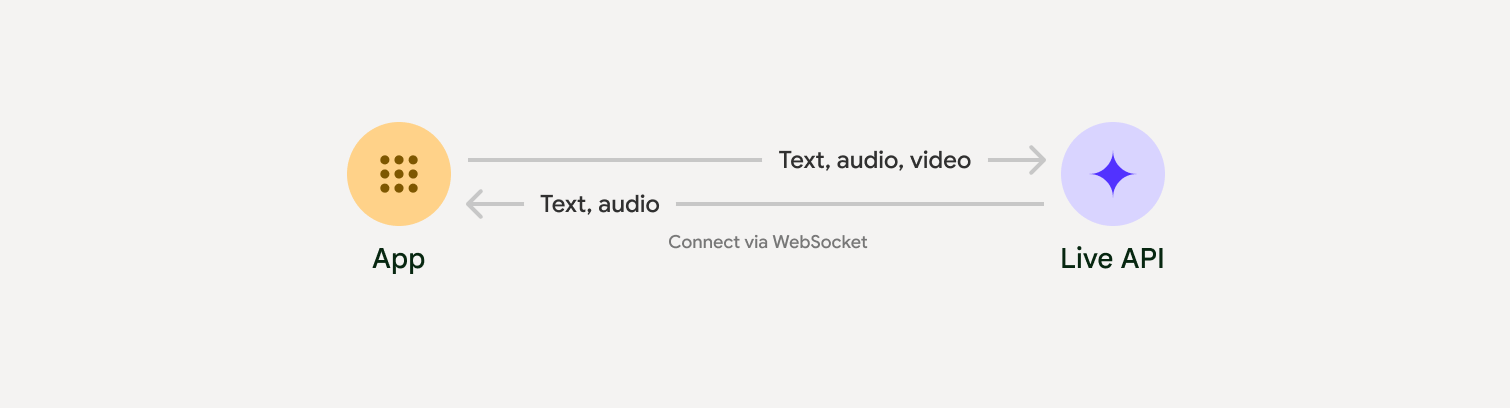
The Live API enables low-latency, real-time voice and video interactions with Gemini. It processes continuous streams of audio, video, or text to deliver immediate, human-like spoken responses, creating a natural conversational experience for your users.
Try the Live API in Google AI Studio
Example use cases
Live API can be used to build real-time voice and video agents for a variety of industries, including:
- E-commerce and retail: Shopping assistants that offer personalized recommendations and support agents that resolve customer issues.
- Gaming: Interactive non-player characters (NPCs), in-game help assistants, and real-time translation of in-game content.
- Next-gen interfaces: Voice- and video-enabled experiences in robotics, smart glasses, and vehicles.
- Healthcare: Health companions for patient support and education.
- Financial services: AI advisors for wealth management and investment guidance.
- Education: AI mentors and learner companions that provide personalized instruction and feedback.
Key features
Live API offers a comprehensive set of features for building robust voice and video agents:
- Multilingual support: Converse in 70 supported languages.
- Barge-in: Users can interrupt the model at any time for responsive interactions.
- Tool use: Integrates tools like function calling and Google Search for dynamic interactions.
- Audio transcriptions: Provides text transcripts of both user input and model output.
- Proactive audio: Lets you control when the model responds and in what contexts.
Technical specifications
The following table outlines the technical specifications for the Live API:
| Category | Details |
|---|---|
| Input modalities | Audio (raw 16-bit PCM audio, 16kHz, little-endian), images/video (JPEG <= 1FPS), text |
| Output modalities | Audio (raw 16-bit PCM audio, 24kHz, little-endian), text |
| Protocol | Stateful WebSocket connection (WSS) |
Examples
- Gen AI SDK Python example: Recommended for ease of use. Connect to the Gemini Live API using the Gen AI SDK to build a real-time multimodal application with a Python backend.
- Epheremal tokens and raw WebSocket example: RAW protocol control. Connect to the Gemini Live API using WebSockets to build a real-time multimodal application with a JavaScript frontend and a Python backend.
- Command-line Python example: A minimal command-line app that streams microphone audio to the Gemini Live API and plays back the response in real time using Python.
- Command-line Node.js example: A minimal command-line app that streams microphone audio to the Gemini Live API and plays back the response in real time using Node.js.
- Command-line Translation Python example: A command-line tool that streams a remote audio URL into the Gemini Live Translate model, plays back the translated audio, and prints transcripts with language codes in real time.
- Broadcast Translation Web App (LiveKit): A production-ready multilingual broadcast app built with Next.js, LiveKit, and the Gemini Live API that translates speaker audio to multiple target languages concurrently with low latency. (Note: This project has moved to a standalone repository)
[!TIP] Install the Gemini Live API Dev skill for AI-assisted development with the Live API in your coding agents.
Partner integrations
To streamline the development of real-time audio and video apps, you can use a third-party integration that supports the Gemini Live API over WebRTC or WebSockets.
- LiveKit: Use the Gemini Live API with LiveKit Agents.
- Pipecat by Daily: Create a real-time AI chatbot using Gemini Live and Pipecat.
- Fishjam by Software Mansion: Create live video and audio streaming applications with Fishjam.
- Vision Agents by Stream: Build real-time voice and video AI applications with Vision Agents.
- Voximplant: Connect inbound and outbound calls to Live API with Voximplant.
- Agent Development Kit (ADK): Create an agent and use the Agent Development Kit (ADK) Streaming to enable voice and video communication.
- Firebase AI SDK: Get started with the Gemini Live API using Firebase AI Logic.