
OmniInfer
English | 简体中文
Easy, fast, and private LLM & VLM inference for every device.

Quick Start · Documentation · Releases
Quick Start
Install OmniInfer
Linux x64
macOS arm64
Windows x64 PowerShell
curl -fsSL https://raw.githubusercontent.com/omnimind-ai/OmniInfer/main/scripts/install.sh | bash
curl -fsSL https://raw.githubusercontent.com/omnimind-ai/OmniInfer/main/scripts/install.sh | bash
irm https://raw.githubusercontent.com/omnimind-ai/OmniInfer/main/scripts/install.ps1 | iex
The installers download the latest CLI-only GitHub Release, verify its SHA-256 checksum, and install it for the current user. For fixed versions, custom paths, manual installation, source setup, and removal, see Installation.
Start in three steps
- Run
omniinferin a terminal. - Choose a compatible backend. The TUI can install an available prebuilt runtime for you.
- Select a local model and start chatting.
To run the local OpenAI- and Anthropic-compatible service, start omniinfer serve and follow the CLI Guide or API Reference. Source builds and mobile embedding are documented separately.
News
- 2026-08-28 — Qwen3.8-Flash-Next support. OmniInfer now tracks llama.cpp
b10665and can load split GGUF model directories directly. Use a source-built llama.cpp backend until the matching prebuilt runtime is published in OmniInfer. - 2026-08-14 — 🚀 Day-0 support for Qwen3.8-27B. OmniInfer is ready for Qwen's latest 27B vision-language model from day one.
Demo
Short, focused recordings of the main entry points. Each demo covers one capability.
Terminal UI — choose a backend, load a model, chat locally
Running omniinfer opens a terminal UI that recommends a compatible backend, loads a local model, and starts a fully local chat session.

Static preview: terminal UI screenshot
Browser VLA demo — SmolVLA on LIBERO
The optional vla-libero example runs a SmolVLA policy through a managed vla.cpp runtime in the LIBERO simulator, showing live camera views, the predicted action, and latency in a browser dashboard.

Static preview: SmolVLA LIBERO dashboard screenshot
About
OmniInfer is a high-performance, cross-platform inference engine for running Large Language Models (LLM) and Vision-Language Models (VLM) locally. It abstracts away model compilation, hardware adaptation, and deployment complexity, enabling efficient local inference with minimal configuration.
OmniInfer powers the inference layer of Omni Studio, a unified model orchestration platform.
OmniInfer is fast with:
- Optimized token generation speed and minimal memory footprint
- Multiple backend engines, including llama.cpp, stable-diffusion.cpp, ik_llama.cpp, MNN, MLX, TurboQuant, LiteRT-LM, ExecuTorch QNN, and OmniInfer Native where supported
- Hardware-aware adaptation and optimization
OmniInfer is flexible and easy to use with:
- Seamless multi-backend switching for the best available engine on each device
- OpenAI-compatible and Anthropic-compatible local API endpoints
- Support for text and vision-language workloads
- Fine-grained parameter control for context length, GPU offloading, KV cache, and backend-native launch options
OmniInfer runs everywhere:
- Linux, macOS, Windows — desktop and server
- Android and iOS — mobile and edge devices
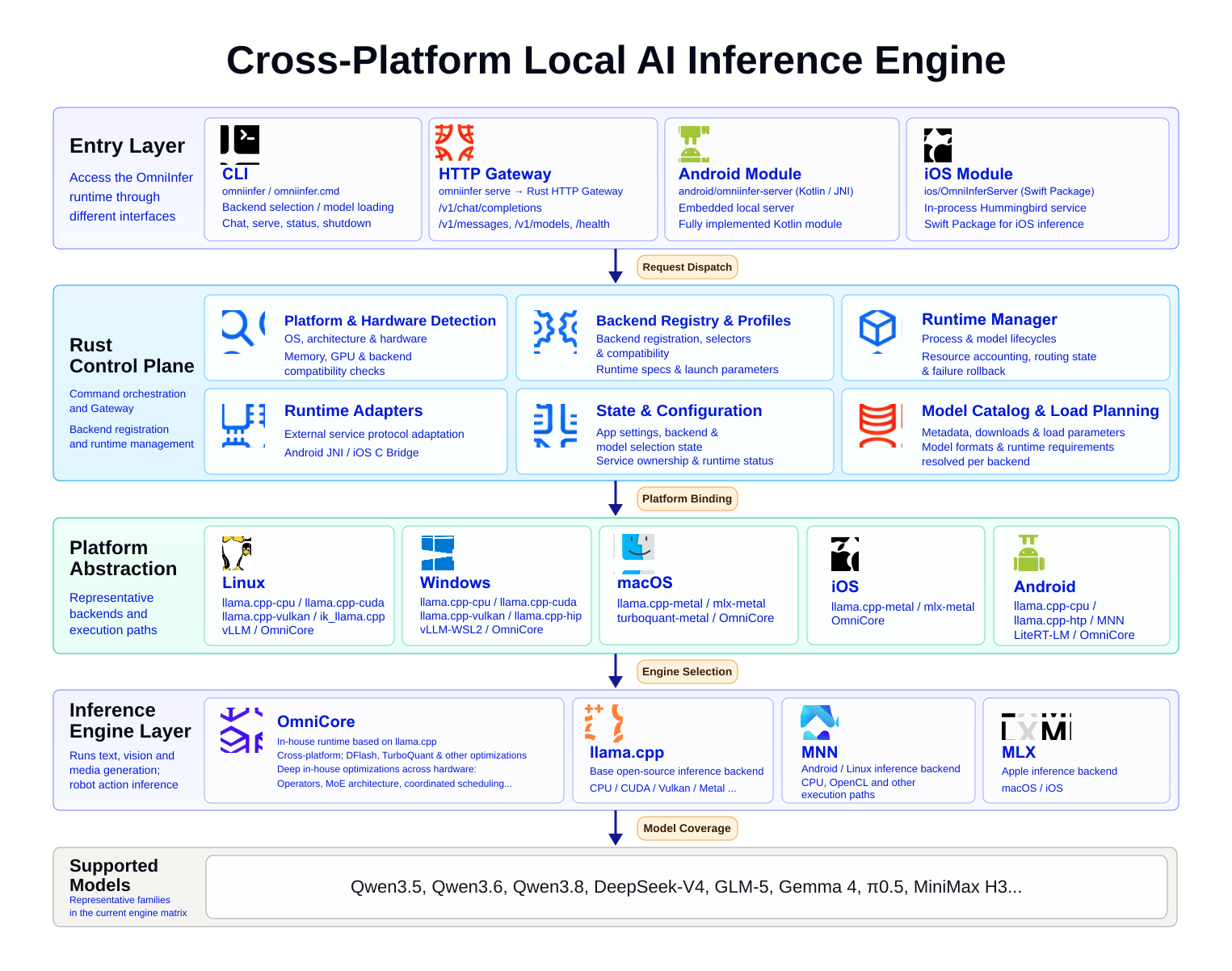
- One codebase across CLI, HTTP gateway, and mobile modules
Platform Support
| Platform | Distribution | Representative runtimes |
|---|---|---|
| Linux x64 | Release CLI and source checkout | llama.cpp, stable-diffusion.cpp, ik_llama.cpp, vLLM, vla.cpp |
| macOS arm64 | Release CLI and source checkout | llama.cpp, MLX, TurboQuant |
| Windows x64 | Release CLI and source checkout | llama.cpp, stable-diffusion.cpp, vLLM through WSL2 |
| Android | Gradle module | llama.cpp, MNN, LiteRT-LM, ExecuTorch QNN |
| iOS | Swift package | Embedded native inference service |
Runtime availability depends on the device and accelerator. Use omniinfer backend list for the current machine; backend names explains selectors and legacy compatibility and see the Build Guide for the full platform matrix.
Documentation
Start here
- Installation: Release installers, version pinning, source setup, manual installation, and removal
- CLI Guide: Backend installation, model loading, chat, serving, and desktop integration
- API Reference: Local OpenAI- and Anthropic-compatible HTTP APIs
Operate and integrate
- Model Loading: Model discovery, parameters, and backend-specific behavior
- Remote Access: LAN access, Cloudflare Quick Tunnel, reverse proxies, and security
- Benchmark Results: Generate and archive submission-compatible benchmark JSON
Build and embed
- Build Guide: Source checkout, backend builds, and platform packaging
- Android Integration: Embed OmniInfer in an Android application
- Android Backend Reference: Android runtime choices and requirements
- Android Smoke Tests and Troubleshooting
Architecture
Contributing
We welcome contributions and collaborations. See Contributing to OmniInfer to get involved.
Citation
If you use OmniInfer in research, cite this repository. GitHub can generate additional formats from CITATION.cff.
@software{omniinfer,
  author = {{Omnimind AI}},
  title = {OmniInfer},
  url = {https://github.com/omnimind-ai/OmniInfer}
}
License
OmniInfer is licensed under the Apache License 2.0. See LICENSE.