
AI-Powered Autonomous Penetration Testing Agent







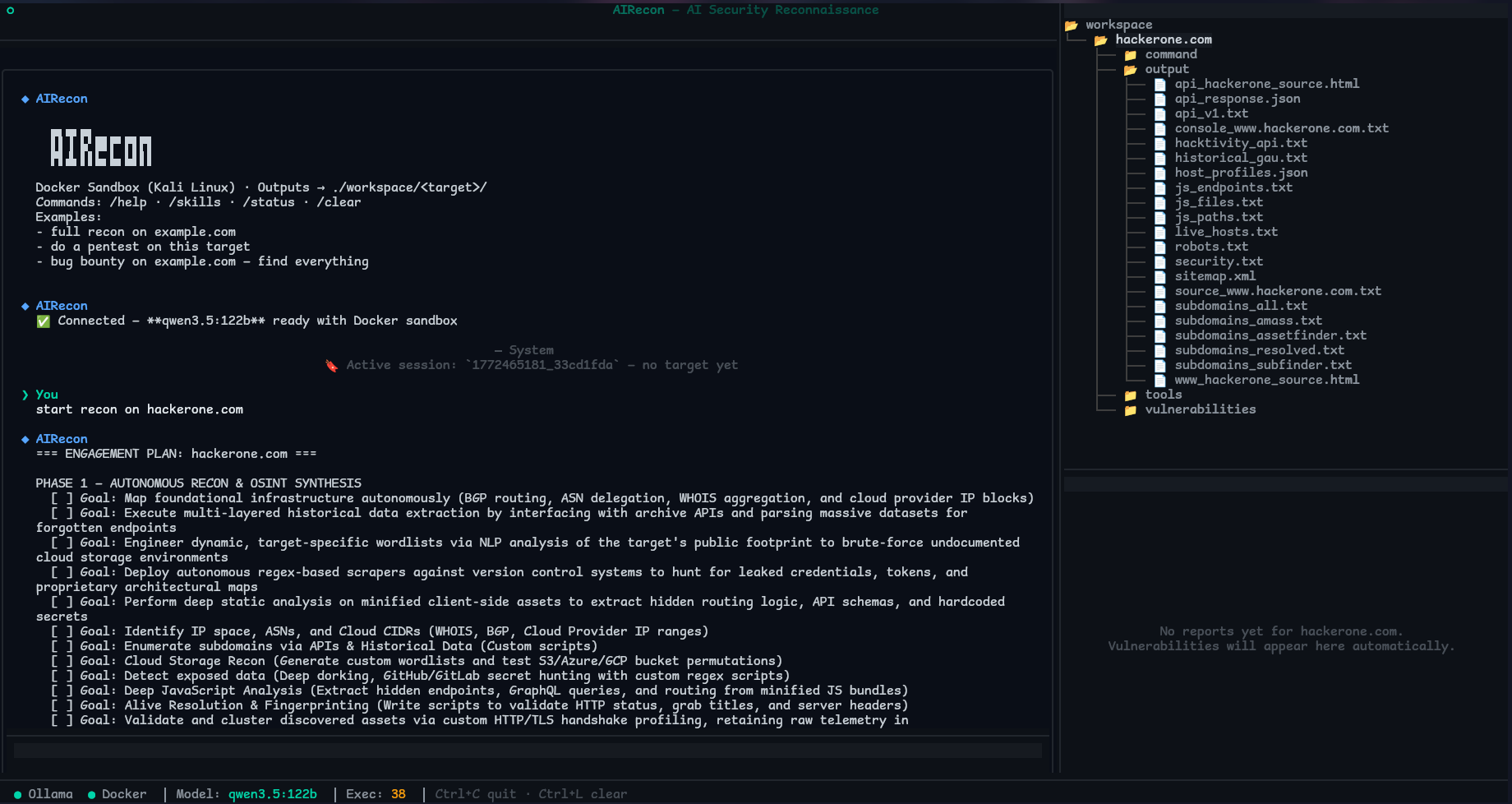
AIRecon is an autonomous penetration testing agent that drives any OpenAI-compatible LLM gateway (LiteLLM / vLLM / a hosted endpoint — or a local gateway proxying a local Ollama) with a Kali Linux Docker sandbox, native Caido proxy integration, a structured RECON → ANALYSIS → EXPLOIT → REPORT pipeline, and a real-time Textual TUI.
Backend-agnostic by design. Point AIRecon at a local gateway (LiteLLM / vLLM, or a gateway proxying a local Ollama) for fully offline / private operation, or at a hosted OpenAI/Anthropic/Gemini-compatible endpoint for maximum reasoning quality. Reasoning support is auto-detected at runtime — no per-model hardcoding.
Sponsor
Swiftproxy – Reliable Residential Proxies for AI-Powered Web Research
Swiftproxy provides 90M+ clean residential IPs across 220+ locations, supporting HTTP(S)/SOCKS5, IP rotation, Sticky Sessions, and precise geo-targeting. It helps AI-powered research and reconnaissance workflows access websites reliably from different locations, making it suitable for web research, data collection, scraping, and location-based access.
Free testing is available, with 10% off using code PROXY90.
Why AIRecon?
AIRecon talks to one OpenAI-compatible gateway, so you choose the trade-off — run a local model for privacy and zero API cost, or a hosted model for top reasoning quality. The same agent, pipeline, sandbox, and tooling work either way.
| Feature | AIRecon |
|---|---|
| Backend | Any OpenAI-compatible gateway (LiteLLM / vLLM / hosted) |
| Fully offline / no API keys | Yes — when using a local gateway (vLLM, or a gateway → local Ollama) |
| Reasoning detection | Automatic at runtime (no model-name hardcoding) |
| Caido integration | Native |
| Scope guard + audit log | Yes — refuse out-of-scope targets, log every command |
| Verified-only learning | Yes — the brain compounds proven findings, not noise |
| Session resume (chat + tool calls) | Yes |
| Local knowledge base | ~1.09M records (optional) |
- Privacy when you want it — with a local gateway, target intelligence, tool output, and reports never leave your machine.
- Caido Native — built-in tools: list, replay, automate (
§FUZZ§), findings, scope, sitemap, intercept. - Full Stack — Kali sandbox + browser automation + custom fuzzer + Schemathesis API fuzzing + Semgrep SAST.
- Skills Knowledge Base — 57 built-in skill files, 289 keyword → skill auto-mappings. Extended by airecon-skills — a community skill library with 57 additional CLI-based playbooks for CTF, bug bounty, and pentesting.
- Local Security Knowledge Base — Optional airecon-dataset indexes ~1.09M security records (CVEs, red team techniques, CTF writeups, nuclei templates, bug bounty payloads) into local SQLite FTS5. The LLM calls
dataset_searchautonomously before attempting unfamiliar techniques — grounding its decisions in real indexed data.
Pipeline
RECON → ANALYSIS → EXPLOIT → REPORT
Each phase has specific objectives, recommended tools, and automatic transition criteria. Phase enforcement is soft — the agent is guided but never blocked. Checkpoints run every 5 (phase eval), 10 (self-eval), and 15 (context compression) iterations.
Memory & Learning (What It Actually Does)
AIRecon does not fine-tune the LLM. Its "learning" is local, structured telemetry that guides tool choice and avoids repeating failed paths.
Local persistence (all on disk, no cloud):
- SQLite memory DB at
~/.airecon/memory/airecon.dbstoring sessions, findings, patterns, target intel, tool usage, model performance, skill usage, and attack-chain discoveries. - Adaptive learning state at
~/.airecon/learning/global_learning.json(tool performance stats, strategy patterns, observation log, distilled insights). - Per-target memory files under
~/.airecon/memory/by_target/when persisted, containing endpoints, vulns, WAF bypasses, sensitive params, and auth endpoints. - Payload memory snapshots can be saved under
workspace//payload_memory.jsonwhen session persistence runs.
How it affects behavior:
- On session start, memory context is injected (target intel, similar findings, learned patterns, tool reliability).
- Cold start: with no learned history for the detected stack, AIRecon injects a knowledge brief from the static
tech_correlationsdataset — so datasets are used as the brain from iteration 1. - Every
intelligence_memory_recall_intervaliterations (default 4), learned patterns / cold-start knowledge are re-injected based on detected tech; correlation runs everyintelligence_correlation_interval(default 6). - Verified-only learning: only findings that were verified (or high-confidence) are persisted to the cross-session brain, so it compounds proven knowledge instead of false positives (
intelligence_learn_only_verified, default on). - Adaptive tool ranking uses historical success/failure to order tools and suggest strategies; within-session learning starts after just
intelligence_adaptive_min_observations(default 2) observations. - Payload memory (when enabled) skips payloads that repeatedly failed for the same target/param.
Model Requirements
AIRecon works with any model your gateway exposes (GPT, Claude, Gemini, Qwen, GLM, DeepSeek, local Ollama/vLLM models, …). Two capabilities matter:
⚠️ Native tool/function calling is REQUIRED. Without it the agent cannot run any tool (http_observe, execute, browser, Caido, …) and is non-functional. Keep
openai_supports_native_tools: true.Reasoning is auto-detected. In
automode AIRecon sends the OpenAI-standardreasoning_effortand, if the backend rejects it (HTTP 400 unsupported-parameter), strips it and remembers — so reasoning models think, plain models don't break. No model-name list to maintain.
Quality guidance (independent of provider):
- Strong reasoning + tool calling (e.g. GPT-5/o-series, Claude Sonnet/Opus 4.x, Gemini 2.5, Qwen3 ≥32B, DeepSeek-R) → reliable full recon pipelines.
- Mid models (8B–14B local) → usable for simple tasks; expect more tool-call errors and hallucinations.
- <8B local → not recommended for serious testing.
For a local/offline setup, run the model behind a local gateway (Ollama/vLLM) and point openai_base_url at it (see Configuration). Quality scales with the model, not with AIRecon.
Running Ollama on Google Colab (Limited Hardware)
If you don't have a GPU or your local VRAM is below the minimum, you can run Ollama on a free Google Colab T4 GPU and connect AIRecon to it via a public tunnel.
Open the notebook:

How it works:
Google Colab GPU                     Your Local Machine
┌──────────────────────────────┐          ┌──────────────────────────────┐
│  Local gateway (qwen3:8b)    │◄────────►│  AIRecon TUI                 │
│  cloudflared tunnel          │  HTTPS   │  openai_base_url: /v1│
└──────────────────────────────┘          └──────────────────────────────┘
Steps:
- Open the Colab link above and select Runtime → Change runtime type → T4 GPU
- Run all cells top to bottom (takes ~5–10 minutes first time)
- Copy the config snippet printed in Cell 6 into
~/.airecon/config.yaml(Colab runs an OpenAI-compatible gateway behind the tunnel):
openai_base_url: "https://xxxx.trycloudflare.com/v1"   # printed by Cell 6 (note the /v1)
openai_api_key: ""                                       # set if the gateway requires one
openai_model: "qwen3:8b"
llm_timeout: 300.0
llm_chunk_timeout: 300.0
llm_context_window: 32768
llm_context_window_small: 16384
- Start AIRecon normally:
airecon start
Colab GPU → model availability:
| Colab GPU | VRAM | Available model | Plan |
|---|---|---|---|
| T4 | 15 GB | qwen3.5:9b |
Free |
| L4 | 22 GB | qwen3.5:35b-a3b (MoE) |
Pro |
| A100 | 40 GB | qwen3.5:35b |
Pro+ |
| H100 | 80 GB | qwen3.5:122b |
Pro+ |
Limitations:
- Colab sessions last max 12 hours (free) / 24 hours (Pro) — tunnel URL changes on reconnect
- T4 with
qwen3.5:9bis the minimum viable setup — expect slower responses and more tool-call errors than a local 35B+ model - Not suitable for long autonomous sessions (deep recon can exceed session limits)
- The Colab notebook is located at
scripts/airecon_colab.ipynbif you want to self-host or modify it
Installation
Prerequisites: Python 3.12+, Docker 20.10+, an OpenAI-compatible LLM gateway reachable at openai_base_url (e.g. a local OpenAI-compatible gateway on http://localhost:20128/v1 — which can itself proxy a local Ollama/vLLM — or a hosted endpoint), git, curl
One-line install (recommended)
curl -fsSL https://raw.githubusercontent.com/pikpikcu/airecon/refs/heads/main/scripts/install.sh | bash
The script auto-detects remote vs local mode, installs Poetry if missing (via official installer — no system package conflicts), builds the wheel, and installs to ~/.local/bin.
Manual install (from source)
git clone https://github.com/pikpikcu/airecon.git
cd airecon
./install.sh
# Add to ~/.bashrc or ~/.zshrc if needed
export PATH="$HOME/.local/bin:$PATH"

airecon --version
Configuration
Config file: ~/.airecon/config.yaml (auto-generated on first run). AIRecon will create ~/.airecon/ if it doesn't exist, including when a custom ~ path is used.
# ======================================
# LLM Backend (OpenAI-compatible / LiteLLM / vLLM / hosted)
# ======================================
# OpenAI-compatible API base URL. REQUIRED. Must include /v1.
# default (local gateway): http://localhost:20128/v1  (a local gateway can proxy a local Ollama)
openai_base_url: "http://localhost:20128/v1"
# API key sent as 'Authorization: Bearer '. Leave empty for local gateways that don't require one.
openai_api_key: ""
# Model name. REQUIRED. e.g. 'claude-sonnet-4', 'gpt-4o', 'gemini-2.0-flash', or 'qwen3:8b' via a local gateway.
openai_model: ""
# Whether the model supports native function/tool calling (REQUIRED for AIRecon to work).
openai_supports_native_tools: true

# ======================================
# LLM Tuning
# ======================================
openai_max_tokens: 16384
openai_temperature: 0.15           # 0.0=deterministic, 0.15=recommended, 0.3=creative
llm_timeout: 180.0
llm_context_window: 65536          # raise for long-context hosted models (131072+)
llm_context_window_small: 32768
llm_enable_thinking: true
llm_thinking_mode: low             # low | medium | high | adaptive
# auto = use reasoning_effort and auto-detect support at runtime (no model-name list).
# off | reasoning_effort | enable_thinking (vLLM/SGLang chat-template flag) to force.
llm_thinking_request_mode: auto

# ======================================
# Scan Profile  (baseline preset; your other keys still override it)
# ======================================
scan_profile: standard             # quick | standard | deep | stealth | ctf | bugbounty

# ======================================
# Scope Guard & Audit  (also settable live via /scope)
# ======================================
scope_allowlist: ""                # comma-sep hosts the agent MAY target (empty = no restriction)
scope_denylist: ""                 # comma-sep hosts never allowed (wins over allowlist)
scope_enforcement: warn            # off | warn (advisory) | block (refuse out-of-scope)
audit_log_enabled: true            # log every command/request to ~/.airecon/audit/audit.jsonl

# ======================================
# Notifications  (on scan completion)
# ======================================
notify_webhook_url: ""             # POST a JSON summary (Slack/Discord/generic). Empty = off
notify_completion_flag: true       # write COMPLETE.json into the target's workspace folder

# ======================================
# Intelligence & Memory  (how the brain learns/recalls)
# ======================================
intelligence_learn_only_verified: true     # persist ONLY verified/high-conf findings to the brain
intelligence_memory_recall_interval: 4      # inject learned patterns / cold-start datasets every N iters
intelligence_correlation_interval: 6        # dataset/finding correlation every N iters

# ======================================
# Tool Health
# ======================================
tool_health_probe_binaries: "nuclei,nmap,ffuf,httpx,katana,subfinder,sqlmap"

# ======================================
# Safety / Docker / Recon
# ======================================
allow_destructive_testing: false
deep_recon_autostart: true
agent_recon_mode: standard         # standard | full
command_timeout: 900.0
docker_memory_limit: 16g
proxy_host: 127.0.0.1
proxy_port: 3000
A freshly generated
config.yamlincludes all of these with inline comments, grouped into sections. Existing configs are migrated (new keys added) on next load.
Local / offline example (a local gateway proxying a local Ollama, no API key):
openai_base_url: "http://localhost:20128/v1"
openai_model: "qwen3:8b"
openai_api_key: ""
Hosted example (set the key your gateway expects):
openai_base_url: "https://your-gateway.example/v1"
openai_model: "claude-sonnet-4"
openai_api_key: "sk-..."
MCP Integration
AIRecon can connect to external MCP servers and expose their tools dynamically as mcp_ tools.
For opt-in, keyless web search and page fetching, see the runnable Parallel Search MCP example.
Config file: ~/.airecon/mcp.json
Example config:
{
  "mcpServers": {
    "hexstrike": {
      "command": "python3",
      "args": [
        "/path/hexstrike-ai/hexstrike_mcp.py",
        "--server",
        "http://127.0.0.1:8888"
      ],
      "env": {
        "PYTHONUNBUFFERED": "1"
      },
      "enabled": true
    },
    "xssgen": {
      "command": "python3",
      "args": [
        "/path/xssgen/xss_client.py",
        "--server",
        "http://127.0.0.1:8000"
      ],
      "env": {
        "PYTHONUNBUFFERED": "1"
      },
      "enabled": true
    },
    "recon": {
      "transport": "sse",
      "url": "https://example.com/mcp",
      "enabled": true,
      "headers": {
        "Authorization": "Bearer xxxxx"
      }
    }
  }
}
Using MCP tools in chat:
- Tool name format:
mcp_ - Actions:
list_tools,search_tools,call_tool
Example:
{"name": "mcp_acme", "arguments": {"action": "list_tools"}}
Knowledge Base (airecon-dataset)
airecon-dataset is an optional companion that downloads security datasets from HuggingFace and indexes them locally into SQLite FTS5 databases. Once installed, the LLM queries them autonomously via the dataset_search tool.
How it works: dataset_search is a standard agent tool in tools.json. The LLM decides when to call it — AIRecon does not auto-trigger it. The system prompt instructs the agent to query the knowledge base before attempting unfamiliar techniques.
git clone https://github.com/pikpikcu/airecon-dataset.git
cd airecon-dataset && python install.py
Datasets included (~1.09M records total, 100% offline):
| Dataset | Records | Content |
|---|---|---|
| Pentest Agent (ChatML) | 322,433 | CVE-based exploitation workflows (MITRE/NVD/ExploitDB) |
| CTF SaTML 2024 | 190,657 | Real attack/defense CTF interaction data |
| CTF Instruct | 141,182 | Pwn, web, crypto, forensics, reverse engineering |
| Cybersecurity CVE | 124,732 | CVE analysis, CVSS, exploitation context |
| SQL Injection Q&A | 50,632 | Conversational SQLi — detection, bypass, exploitation |
| Cybersecurity Fenrir | 83,918 | Attack/defense instruction pairs |
| Red Team Offensive | 78,430 | Lateral movement, privilege escalation, evasion |
| Cybersecurity Q&A | 53,199 | Broad security knowledge |
| StackExchange RE | 20,641 | Binary analysis, disassembly, debugging, malware |
| Nuclei Templates | 23,180 | Nuclei YAML template generation |
| NVD Security Instructions | 2,063 | Structured CVE analysis with severity and remediation |
| APT Privilege Escalation | 1,000 | Linux priv esc techniques with APT tactics |
| Bug Bounty & Pentest | 146 | Payloads, bypass methods, report templates |
Example agent queries (called autonomously by the LLM):
dataset_search: {"query": "log4j RCE exploitation chain"}
dataset_search: {"query": "SSRF bypass cloud metadata", "category": "bug-bounty"}
dataset_search: {"query": "nuclei template XSS detection"}
dataset_search: {"query": "CVE 2021 44228", "category": "vulnerability"}
Results are capped at 500 chars each. Special chars in CVE IDs (dashes, brackets) are sanitized automatically.
Usage
airecon start                          # start TUI
airecon start --session   # resume session (replays prior chat + tool calls)
TUI slash commands:
/help                         show commands
/status                       LLM/Docker/tool health + active scope & scan profile
/models [name]                list models (with reasoning capability) / switch
/think true|false             toggle thinking
/shell               run a command in the Kali sandbox (scope-guarded + audited)
/scope                        show scope; allow/deny ; mode off|warn|block; clear
/skills · /mcp · /reset · /clear
Example prompts:
# Full pipeline
full recon on example.com
pentest https://api.example.com

# Specific tasks
find subdomains of example.com
scan ports on 10.0.0.1
check for XSS on https://example.com/search
test SQL injection on https://example.com/api/login parameter: username
run schemathesis on https://example.com/openapi.json

# Authenticated testing
login to https://example.com/login with admin@example.com / password123 then test for IDOR
test https://app.example.com with TOTP: JBSWY3DPEHPK3PXP

# Multi-agent
spawn an XSS specialist on https://example.com/search
run parallel recon on: example.com, sub.example.com, api.example.com

# Caido
replay request #1234 with a modified Authorization header
use Caido to fuzz the username parameter in request #45 with §FUZZ§ markers
Workspace
workspace//
      ├── command/              # system-managed logs
      ├── output/               # Raw tool outputs (nmap, httpx, nuclei, subfinder, ...)
      ├── tools/                # AI-generated exploit scripts (.py, .sh)
      ├── vulnerabilities/      # Reports (.md) + .evidence.json (captured request/response proof)
      └── COMPLETE.json         # scan-completion summary (when notify_completion_flag is on)
Each report .md carries a finding-status label (VALIDATED / SUSPECTED / INFORMATIONAL), an optional CWE/OWASP classification, a ## Verification section, and a linked evidence artifact.
Sessions persist at ~/.airecon/sessions/.json — subdomains, ports, technologies, URLs, vulnerabilities (Jaccard dedup), auth tokens, completed phases, and the recent raw chat/tool turns used to replay history on resume. The command/request audit trail is at ~/.airecon/audit/audit.jsonl.
Troubleshooting
"Proxy thread stopped before responding" — the proxy worker failed to start. The full crash-log path is now printed in the error (e.g. /tmp/airecon_proxy_crash.log, or $TMPDIR/... on macOS). Most common causes: a missing Python dependency, or the proxy port (proxy_port, default 3000) already in use. Run with AIRECON_DEBUG=1 for full logs.
LLM backend errors / OOM on a local model — restart your gateway/model server and lower context/output budgets:
llm_context_window: 32768
llm_context_window_small: 16384
openai_max_tokens: 8192
Agent loops/stalls — Usually a reasoning failure. Try a stronger model, or reduce openai_temperature to < 0.2.
Docker sandbox not starting:
docker build -t airecon-sandbox airecon/containers/kali/
Caido connection refused — Caido must be running before AIRecon. Default: 127.0.0.1:48080.
PATH not found after install:
export PATH="$HOME/.local/bin:$PATH" && source ~/.zshrc
Star History
Contributing
Issues and PRs are welcome. If you report a bug, include logs, config, and minimal steps to reproduce.
Responsible Use
AIRecon is for authorized security testing only. Always obtain explicit permission and follow applicable laws and program scope.
License
See LICENSE.