DATAGEN (Previously AI-Data-Analysis-MultiAgent)

About DATAGEN
DATAGEN is a powerful brand name that represents our vision of leveraging artificial intelligence technology for data generation and analysis. The name combines "DATA" and "GEN"(generation), perfectly embodying the core functionality of this project - automated data analysis and research through a multi-agent system.
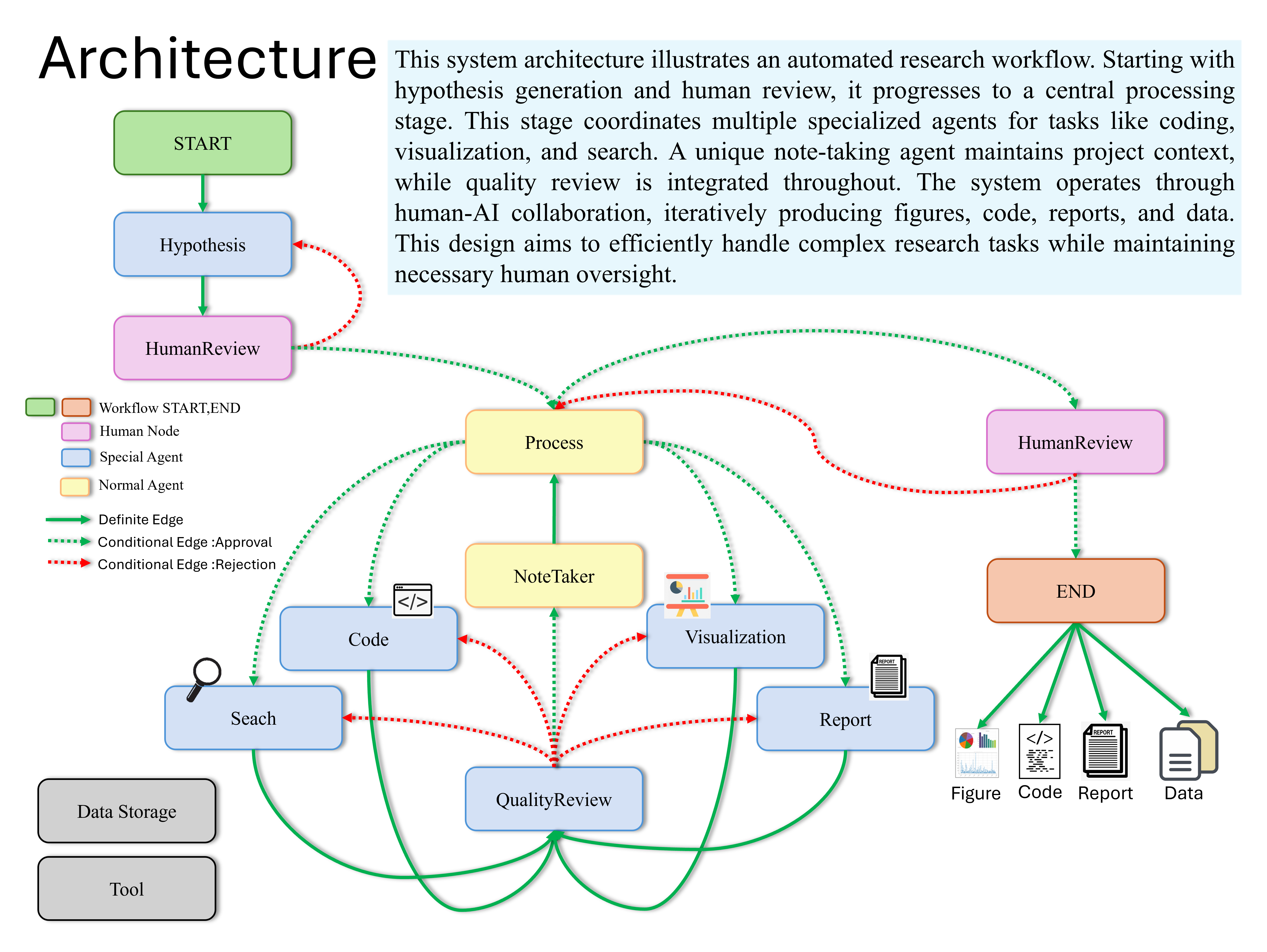
Overview
DATAGEN is an advanced AI-powered data analysis and research platform that utilizes multiple specialized agents to streamline tasks such as data analysis, visualization, and report generation. Our platform leverages cutting-edge technologies including LangChain, OpenAI's GPT models, and LangGraph to handle complex research processes, integrating diverse AI architectures for optimal performance.
Key Features
Intelligent Analysis Core
- Advanced Hypothesis Engine
- AI-driven hypothesis generation and validation
- Automated research direction optimization
- Real-time hypothesis refinement
- Enterprise Data Processing
- Robust data cleaning and transformation
- Scalable analysis pipelines
- Automated quality assurance
- Dynamic Visualization Suite
- Interactive data visualization
- Custom report generation
- Automated insight extraction
Advanced Technical Architecture
- Multi-Agent Intelligence
- Specialized agents for diverse tasks
- Intelligent task distribution
- Real-time coordination and optimization
- Smart Memory Management
- State-of-the-art Note Taker agent
- Efficient context retention system
- Seamless workflow integration
- Adaptive Processing Pipeline
- Dynamic workflow adjustment
- Automated resource optimization
- Real-time performance monitoring
Why DATAGEN Stands Out
DATAGEN revolutionizes data analysis through its innovative multi-agent architecture and intelligent automation capabilities:
-
Advanced Multi-Agent System
- Specialized agents working in harmony
- Intelligent task distribution and coordination
- Real-time adaptation to complex analysis requirements
-
Smart Context Management
- Pioneering Note Taker agent for state tracking
- Efficient memory utilization and context retention
- Seamless integration across analysis phases
-
Enterprise-Grade Performance
- Robust and scalable architecture
- Consistent and reliable outcomes
- Production-ready implementation
System Requirements
- Python 3.10 or higher
Installation
- Clone the repository:
git clone https://github.com/starpig1129/DATAGEN.git
- Create and activate a Conda virtual environment:
conda create -n datagen python=3.10
conda activate datagen
- Install dependencies:
pip install -r requirements.txt
- Set up environment variables:
Rename
.env Exampleto.envand fill all the values
# Your data storage path (required)
# Also used by filesystem MCP server
WORKING_DIRECTORY = ./data/

# Configuration directory path (optional)
# All config files (agent_models.yaml, agents/, mcp.yaml) are relative to this directory.
# Default is config/
# Use 'config_local' for local development to avoid Git tracking (already in .gitignore)
CONFIG_DIRECTORY = config

# Conda environment name (required)
CONDA_ENV = datagen

# ChromeDriver executable path (required)
CHROMEDRIVER_PATH = ./chromedriver-linux64/chromedriver

# Firecrawl API key (optional)
# Note: If this key is missing, query capabilities may be reduced
FIRECRAWL_API_KEY = XXXXXXXXXXXXXXXXXXXXXXXXXXXXXXXXXXXX

# fastCRW (Firecrawl-compatible web scraper; single binary, self-host or cloud) (optional)
# API key for the managed cloud; optional for self-host
CRW_API_KEY = XXXXXXXXXXXXXXXXXXXXXXXXXXXXXXXXXXXX
# Defaults to the managed cloud; override for self-host (e.g. http://localhost:3000)
CRW_API_URL = https://fastcrw.com/api

# OpenAI API key (optional)
OPENAI_API_KEY = XXXXXXXXXXXXXXXXXXXXXXXXXXXXXXXXXXXX
# Anthropic API key (optional)
ANTHROPIC_API_KEY = XXXXXXXXXXXXXXXXXXXXXXXXXXXXXXXXXXXX
# Google API key (optional)
GOOGLE_API_KEY = XXXXXXXXXXXXXXXXXXXXXXXXXXXXXXXXXXXX
# Atlas Cloud API key (optional)
ATLASCLOUD_API_KEY = XXXXXXXXXXXXXXXXXXXXXXXXXXXXXXXXXXXX
# OrcaRouter API key (optional; for the orcarouter provider)
ORCAROUTER_API_KEY = XXXXXXXXXXXXXXXXXXXXXXXXXXXXXXXXXXXX

# LangChain API key (optional)
# Used for monitoring the processing
LANGCHAIN_TRACING_V2 = true
LANGCHAIN_PROJECT = "Multi-agent-DataAnalysis"
LANGCHAIN_API_KEY = XXXXXXXXXXXXXXXXXXXXXXXXXXXXXXXXXXXX

# MCP (Model Context Protocol) Settings (optional)
# Tavily API key for web-search MCP server
TAVILY_API_KEY = XXXXXXXXXXXXXXXXXXXXXXXXXXXXXXXXXXXX
# GitHub token for github MCP server
GITHUB_TOKEN = XXXXXXXXXXXXXXXXXXXXXXXXXXXXXXXXXXXX
Usage
Using Python Script
You can run the system using main.py:
-
Place your data file (e.g., YourDataName.csv) in the data directory
-
Modify the user_input variable in the main() function of main.py:
user_input = '''
datapath:YourDataName.csv
Use machine learning to perform data analysis and write complete graphical reports
'''
ˇ. Run the script:
python main.py
Main Components
hypothesis_agent: Generates research hypothesesprocess_agent: Supervises the entire research processvisualization_agent: Creates data visualizationscode_agent: Writes data analysis codesearcher_agent: Conducts literature and web searchesreport_agent: Writes research reportsquality_review_agent: Performs quality reviewsnote_agent: Records the research process
Workflow
The system uses LangGraph to create a state graph that manages the entire research process. The workflow includes the following steps:
- Hypothesis generation
- Human choice (continue or regenerate hypothesis)
- Processing (including data analysis, visualization, search, and report writing)
- Quality review
- Revision as needed
Agent Model Configuration
Users can customize each agent's language model provider and model configuration by editing the agent_models.yaml file (located in your CONFIG_DIRECTORY). This allows for seamless environment switching (dev/prod) by simply pointing to a different configuration folder.
Here's an example structure of agent_models.yaml:
agents:
  hypothesis_agent:
    provider: openai
    model_config:
      model: gpt-5.6-luna
      temperature: 1.0
  note_agent:
    provider: google
    model_config:
      model: gemini-3.1-pro-preview
  code_agent:
    provider: anthropic
    model_config:
      model: claude-sonnet-5
- provider: Specifies the language model provider to use (e.g., openai, google, anthropic, ollama, groq, atlascloud, orcarouter)
- model_config: Contains model-specific configuration parameters
model: The specific model name to usetemperature: Controls the randomness of model output (range: 0.0-2.0). Omit it for models that do not accept it: Gemini 3.x ignores it, and Claude Sonnet 5 rejects any value other than its default.
The atlascloud provider reads ATLASCLOUD_API_KEY and uses Atlas Cloud's OpenAI-compatible endpoint. Choose a model from the current Atlas Cloud model catalog, for example:
  report_agent:
    provider: atlascloud
    model_config:
      model: openai/gpt-5.4
      temperature: 1.0
Advanced Configuration System
DATAGEN implements a powerful Progressive Disclosure architecture for agent configuration, inspired by Claude Agent Skills.
Documentation
| Guide | Description |
|---|---|
| System Architecture | High-level overview and core concepts |
| Quick Start | Create a new agent in 5 minutes |
| Agent Config Reference | AGENT.md and config.yaml full reference |
| Tool Configuration | Available tools and custom tool creation |
| Skill Configuration | Create and use reusable knowledge modules |
| MCP Configuration | Model Context Protocol server setup |
Key Features
- Unified Config Root: All core settings are managed via the
CONFIG_DIRECTORYenvironment variable. - Skill-Based Architecture: Reusable skills stored in
skills/(within the config root) - Dynamic Tool Loading: Tools configured via
config.yamlusingToolFactory - Model Context Protocol (MCP): External server integration (Filesystem, GitHub, Web Search)
- Progressive Disclosure: Three-level loading strategy for Context Window optimization
Notes
- Ensure you have sufficient API credits, as the system will make multiple API calls.
- The system may take some time to complete the entire research process, depending on the complexity of the task.
- WARNING: The agent system may modify the data being analyzed. It is highly recommended to backup your data before using this system.
- DATAGEN does not ship or train on project-provided training datasets. Users provide their own analysis data at runtime through
WORKING_DIRECTORY.
Current Issues and Solutions
- NoteTaker Efficiency Improvement
- Overall Runtime Optimization
- Refiner needs to be better
Contributing
Pull requests are welcome. For major changes, please open an issue first to discuss what you would like to change.
Development checks
CI runs these on every pull request. Run them locally before pushing:
pip install -r requirements.txt -r requirements-dev.txt
ruff check main.py src tests
ruff format --check main.py src tests
mypy
pytest
ruff format main.py src tests fixes formatting. To hide the one-time formatting commit from git blame, run git config blame.ignoreRevsFile .git-blame-ignore-revs.
License
This project is licensed under the MIT License - see the LICENSE file for details.
Star History
Other Projects
Here are some of my other notable projects:
PheroPath
PheroPath is a filesystem-based stigmergy communication protocol that allows agents and humans to leave invisible "pheromones" (signals) on files. It enables communicating context, risks (DANGER), or status (TODO, SAFE) without modifying the file content itself, facilitating better multi-agent collaboration.
- GitHub: PheroPath
PigPig: Advanced Multi-modal LLM Discord Bot
A powerful Discord bot based on multi-modal Large Language Models (LLM), designed to interact with users through natural language. It combines advanced AI capabilities with practical features, offering a rich experience for Discord communities.
- GitHub: ai-discord-bot-PigPig
research-lab-skills
Composable Agent Skills covering the complete research lifecycle: literature review, research logs, experiment tracking, analysis, lab presentations, manuscript writing, and peer review.
- GitHub: research-lab-skills